Another gem of a question found on the Growthbook Slack channel #ask-questions:

So before we go into this. An important note. When you when you update the assigning attribute i.e. a userId to a new value when the visitor was already exposed to a a experiment then it’s possible that the visitor will be bucketed into a different variation as the userId is different from what it was before.
You can test this simply by creating a feature with an experiment rule and then scroll down to the Test Feature Rules section.
There just keep changing the attribute value of the assigning attribute that you choose for your experiment.

Then you will see that the variationId can change from value.
So it’s important that you keep the value for the assigning attribute the same throughout the visitor sessions. So in this example one could create two seperate attributes:
– anonymous_id
– proper_user_id
Keep the anonymous_id throughout the visitor and use it as an assigning attribute. Then during the journey when the proper_user_id is known set the value in the dedicated attribute proper_user_id.
Now we are sure that the visitor keeps seeing the variation to which it was bucketed originally.
As an example anonymous_id could be the value stored in your analytics client id for Google Analytics this is the value stored in the _ga cookie.
Lorem ipsum dolor sit amet, consectetur adipiscing elit. Ut elit tellus, luctus nec ullamcorper mattis, pulvinar dapibus leo.

Stitching it back together
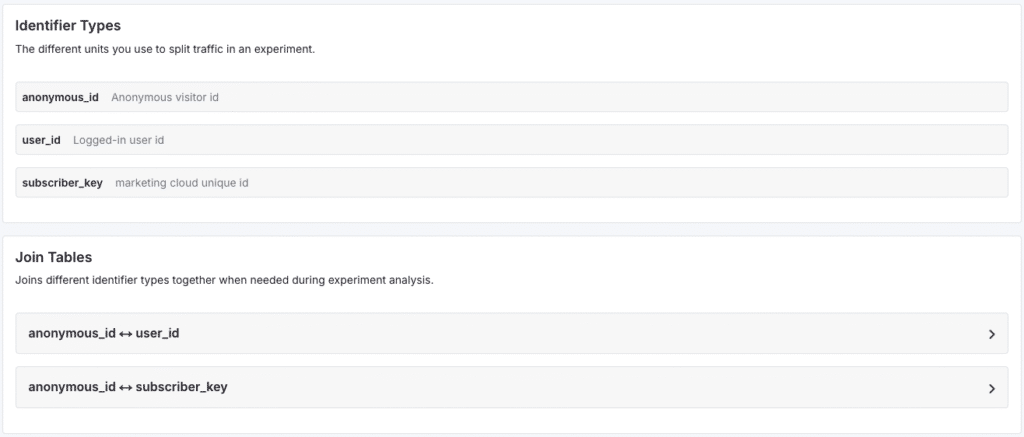
Now to keep the analysis also in the right order in such a way that you can follow anonymous users that login you can do the following. In your Growthbook datasource configuration you choose your datasource:

There you can set your Identifier Types and join them together with Join Tables.
So there you go.. now you should get proper data for analysis and also you site visitors will have a consistent experience.